 ultimate-guide
Managed Network Support for Rural Businesses
Last Updated: November 2, 2026
Quick Summary
Managed network support means handing day-to-day oversight of your business network to an outside provider who monitors, maintains, secures, and repairs it under a defined service agreement. For rural businesses, it replaces the call-someone-when-it-breaks model with continuous coverage and accountability for uptime.
- Most plans bundle four services: monitoring, maintenance, security, and response.
- A clear signal you need help is when nobody on staff knows what to do if the internet drops.
- Separate guest Wi-Fi from the network handling payments and records.
- Monitoring can catch a backup job that has been silently failing for weeks.
- Ask whether the on-site response window is measured in business or clock hours.
Table of Contents
- What Managed Network Support Includes for Rural Businesses
- When a Rural Business Actually Needs Managed Network Help
- Small Business Network Setup That Survives Rural Conditions
- Small Business Network Monitoring and What It Catches
- Business Network Security Services for Rural Operations
- Rural Connectivity Constraints and Backup Options
- On-Site Response Coverage and Remote Support Limits
- Pricing, Service-Level Agreements, and What to Ask a Provider
- Preparing Your Network for an Outage and Getting Back Up
- Getting a Straight Answer on Your Network
- Frequently Asked Questions
What Managed Network Support Includes for Rural Businesses
Managed network support is the practice of handing day-to-day oversight of your business network to an outside provider who monitors, maintains, secures, and repairs it under a defined service agreement. For a rural business, that arrangement replaces the "call someone when it breaks" model with continuous coverage. We understand that for rural businesses, help is not always a five-minute drive away.
The distinction matters most when something fails at the worst possible moment. A POS terminal that will not connect, a card reader that times out, or a shared drive that disappears mid-invoice is not an inconvenience in a small operation. It is the day's revenue.
Below, we break down what a support plan actually contains, when it pays for itself, and the questions that separate a real provider from a phone number that goes to voicemail.
The Core Services in a Typical Support Plan
Most plans bundle four things: monitoring, maintenance, security, and response. Monitoring means something is watching your routers, switches, and endpoints around the clock and alerting on failures before staff notice. Maintenance covers firmware updates, patch management, and configuration reviews on a schedule. Security includes firewall management, endpoint protection, and account hygiene. Response is the human piece: a defined path to a technician when something breaks.
Good plans also document your network, including an inventory of devices, their locations, and their configurations, so that a failed component can be replaced quickly.
How It Differs From General IT Support
General IT support fixes devices. Managed network support owns the connections between them.
A break-fix shop repairs your laptop. A managed provider looks beyond the individual device to find the underlying network cause of a recurring problem. One is reactive and per-incident. The other is continuous and accountable for uptime.
Accountability for network reliability gives a provider a reason to address aging hardware before it fails.
When a Rural Business Actually Needs Managed Network Help
A clear signal is when nobody on staff knows what to do when the internet drops.
A short self-check helps here. If two or more of these describe your operation, managed support is worth pricing out:
- Your network has grown past a single router and a handful of devices
- You handle payment cards, patient records, or client financial data
- Downtime for one hour costs you real revenue or missed appointments
- No one on staff can explain how your firewall is configured
- You have replaced a router or switch in the last two years because it failed
- You cannot say when your last backup was verified
The second signal is growth. Adding a second location, a new POS system, or a cloud-based scheduling tool changes your network's shape. Most small businesses never re-plan the network after that change, which is where performance problems and security gaps quietly begin.
Waiting for a failure to force the decision is a costly mistake, and a network that has never been documented is far more expensive to recover than one that has.
Small Business Network Setup That Survives Rural Conditions
A rural small business network setup should assume three things: power will flicker, the internet will drop, and nobody will be on site at 2 a.m. Design for those conditions and the network holds up.
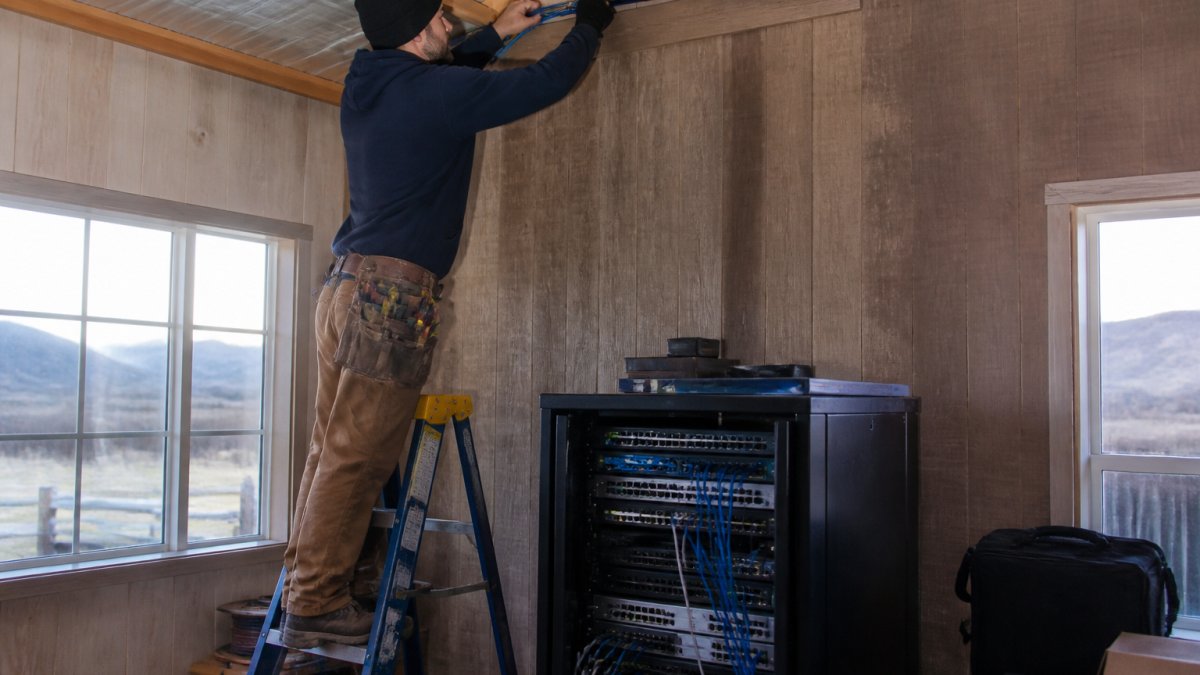
Start with the physical layer. Structured cabling run properly, labeled at both ends, and protected from moisture and rodents outlasts wireless for anything stationary. Battery backup for business equipment can keep a brief outage from rebooting a switch or POS terminal mid-transaction. Separate guest Wi-Fi from the network that handles payments and records, because a shared password on a single network is how one compromised phone becomes a compromised business.
Then plan for bandwidth honestly. Rural connections vary widely in speed and reliability, so a setup should prioritize the traffic that matters. Payment processing, VoIP calls, and cloud backups need priority over a customer streaming video in the lobby. A router that can enforce that priority costs far less than the frustration of a dropped call during a supply order.
Small Business Network Monitoring and What It Catches
Small business network monitoring is the continuous watch over your equipment and connections that surfaces problems before your staff do. It catches the failures that are invisible until they are expensive.
The list of what monitoring actually finds is longer than most owners expect:
- A switch port running at degraded speed after a cable was damaged
- A hard drive in a server or NAS approaching failure
- A device that dropped off the network and never came back
- Repeated login failures suggesting someone is guessing at credentials
- A backup job that has been silently failing for weeks
- Bandwidth saturation at the same time every day, pointing to a specific cause
The backup failure is the one that hurts most. A business that believes it has backups and discovers otherwise during a recovery is in a worse position than one that never assumed anything.
Remote monitoring can reduce the need for a site visit, since an issue may sometimes be resolved remotely before anyone drives out.
Business Network Security Services for Rural Operations
Small rural operations can be targets too, since automated attacks do not depend on a business's location.
The basics that matter most are unglamorous. A properly configured firewall with no unnecessary open ports. Multi-factor authentication on email and any account that touches money. Endpoint protection that is actually updating. A written list of who has access to what, reviewed when someone leaves. Patch management so known vulnerabilities get closed instead of waiting for a convenient time.
Healthcare providers carry an additional burden. If you handle patient records, your obligations under HIPAA include administrative, physical, and technical safeguards, and the HHS guidance on the HIPAA Security Rule lays out what those safeguards must cover. A network that was never designed with those requirements in mind usually fails an audit on documentation alone. If you are unsure where you stand, an independent security audit is cheaper than a breach.
Watch out: a firewall installed years ago and never reviewed, with default settings or outdated firmware, can leave open doors.
Rural Connectivity Constraints and Backup Options
Rural connectivity is the constraint that shapes every other decision. Where a single provider serves the area, a single point of failure sits between your business and the internet.
A backup connection on different infrastructure can reduce this risk, such as a second provider if one exists, a fixed wireless service, or a cellular router with a data plan. The key is that the backup does not share a failure mode with the primary. Two services from the same provider on the same line protect you from almost nothing.
A good backup connection does not need to carry everything. It needs to keep payments, phones, and cloud access running until the primary comes back. Configure the failover to prioritize those services and the business keeps operating.
If your area has limited broadband options, the FCC's broadband availability resources can help you see what service types are reported for your location. Availability data is not perfect, but it is a starting point for a conversation with providers about what is actually installable.
On-Site Response Coverage and Remote Support Limits
On-site response coverage is where rural providers separate themselves, and it is the question to ask first. Remote support handles most issues, but not all of them. A failed switch, a cut cable, or a dead firewall needs hands on the equipment.
When evaluating any provider, ask how far they routinely travel, what their on-site response window is, whether that window is measured in business or clock hours, and whether it is written into the agreement. A provider two hours away may be excellent and still unable to meet a four-hour on-site commitment. Distance is not a criticism. It is a planning input.
How Response Windows Are Usually Structured
Many managed providers distinguish a remote response target from an on-site arrival target, and the on-site target is often longer for locations farther from the technician's base. Ask which clock starts when, at your call, at their acknowledgment, or at remote diagnosis confirmation. The difference matters when you are deciding whether to wait or drive to a backup location.
Coverage hours are the other half of the clock. Coverage outside business hours is often billed as an after-hours option or a higher service tier. For a business that takes payments on Saturday, that distinction is the difference between a covered incident and an uncovered one.
What Remote Support Actually Covers
Remote support can cover many issues, including configuration changes, firmware and patch deployment, and some performance fixes, without a site visit.
The limits show up in hardware and physical infrastructure. Anything that requires touching a device, running or terminating a cable, replacing a component, or working around a failed power supply is an on-site job. So is anything involving a device that has dropped off the network entirely and cannot be reached remotely.
Spare Parts, Escalation, and the Practical Middle Ground
For a business that cannot tolerate a long gap, ask whether a provider keeps common replacement hardware such as spare routers, switches, and power supplies on hand, and whether those parts are included in the plan or billed separately. Ask what happens when the first technician cannot resolve the issue, who escalates, how quickly, and whether the escalation path is documented.
Watch out: a fast on-site window should be backed by clear details about who will respond, how they will travel, and what parts are available. Get the window, the coverage hours, and the parts policy in writing before you sign.
Pricing, Service-Level Agreements, and What to Ask a Provider
Pricing for managed network support depends on factors such as device count, site count, service scope, travel distance, and coverage hours. For current pricing and a quote built around your operation, see our small business solutions.
Rural pricing can be affected by factors such as distance, limited connectivity, older or mixed equipment, and after-hours coverage, which are often priced as a tier or add-on.
The service-level agreement is the part worth reading closely. It should state:
| What to Check | Why It Matters |
|---|---|
| Response time definition | Does the clock start at your call or at their acknowledgment? |
| On-site window | How many hours or business days until a technician arrives, and does it change by distance? |
| Coverage hours | Are evenings and weekends included or billed extra? |
| Hardware responsibility | Who buys and stocks replacement equipment, and are parts included or billed? |
| Backup-link support | Does the plan cover failover configuration and testing for a secondary connection? |
| Exclusions | What is explicitly not covered? |
| Reporting | Do you get a monthly summary of what was monitored and fixed? |
| Term and exit | How long is the commitment, and what happens at renewal or cancellation? |
A provider who will not put response times in writing is offering a hope, not a service level. The reporting clause matters too, because it forces a record of what actually happened.
Questions to Ask Before You Compare Quotes
- What exactly is monitored, and how often?
- Is the on-site window measured in business hours or clock hours, and does it vary by distance?
- Are spare parts included, or billed separately when something fails?
- Does the plan cover configuring and testing a backup internet connection?
- What is excluded, and what triggers an extra charge?
- How long is the term, and what are the exit terms?
- Can you show a sample monthly report?
Watch out: a fast response target that applies only during business hours, paired with a longer on-site window for distant sites, can be a gap in rural plans. Read the coverage-hours and distance clauses together, not separately, or the headline number will mislead you.
Preparing Your Network for an Outage and Getting Back Up
Business continuity planning starts with accepting that an outage will happen. The question is whether it costs you an afternoon or a week.
CISA's guidance on essential business continuity planning is a practical place to start. It walks through identifying what your business cannot operate without, which for most rural operations is a short list: payments, phones, and access to records.
Build around that list. Keep a written network diagram and a list of every device with its model and configuration. Keep a spare router or switch on the shelf if your operation cannot wait for shipping. Verify backups by restoring a file, not by reading a log that says the job completed. Test your failover connection on a quiet day so you know it works before you need it.
Disaster recovery is the other half. Know who you call, in what order, and what you do in the first hour. A one-page plan taped inside a cabinet beats a perfect plan nobody can find.
Getting a Straight Answer on Your Network
The gap between a network that runs and one that merely works most days is usually documentation and follow-through. Most rural businesses do not need a large IT department. They need someone who knows their network, answers the phone, and tells them the truth about what needs replacing.
Hells Canyon Computers offers business systems and networks support. Our customers have noted that we do not push unnecessary repairs. Dave P. put it simply: "They're honest about what needs to be done and don't try to upsell unnecessary repairs."
If your network has never been documented, or you are not sure what happens when the internet drops, that is the conversation to have now rather than during an outage. Contact Hells Canyon Computers to discuss your network needs. Call 541-742-2129.
Frequently Asked Questions
What does managed network support include for a small business?
A typical plan covers proactive monitoring of routers, switches, and access points; firewall management and threat protection; patching and network maintenance; remote troubleshooting and help desk access; and some level of on-site response. Many providers also handle backup connectivity planning and structured cabling. Ask for the scope in writing, because plans vary widely. Confirm whether hardware, after-hours coverage, and on-site visits are included or billed separately, and get the response time commitment stated in the service-level agreement.
How can managed network support help a business with unreliable rural internet?
The provider cannot create broadband that does not exist, but they can design around it. That usually means a second connection on a different technology, such as a fixed wireless link or a cellular modem, with automatic failover at the router. They can also configure quality-of-service rules so point-of-sale and VoIP phone systems get priority over guest Wi-Fi, and set up monitoring that alerts you when a circuit degrades before staff notice. Ask specifically how failover is tested and how often.
Can a provider monitor a business network remotely?
Yes. Remote monitoring tools watch uptime, bandwidth, device health, and security events over the internet, which is why rural businesses can get most day-to-day support without a truck roll. What remote support cannot do is replace failed hardware, terminate cabling, or troubleshoot a physical link. Ask any provider how far they will travel for on-site work, what response window applies, and whether travel time is billed. Those three answers matter more in rural areas than the monitoring tool itself.
How do business network security services protect a small operation?
Layered defenses do most of the work: a managed firewall, intrusion detection, endpoint protection on each machine, and consistent patching. For healthcare clients, HIPAA requires administrative, physical, and technical safeguards for patient data, so ask for a security audit and documented policies rather than a verbal assurance. A provider should be able to explain what happens when a threat is detected, who is notified, and how quickly. Get that incident response process in writing before you sign.
What is the difference between managed network support and general IT support?
General IT support is usually reactive: something breaks, you call, someone fixes it. Managed network support is ongoing and preventive, with monitoring, maintenance, and a defined scope of responsibility for the network itself. The network piece covers routers, switches, firewalls, Wi-Fi, and connectivity, while general IT support often extends to individual devices, software, and user accounts. Many small businesses need both, and some providers bundle them.
How can a business prepare its network for an internet or power outage?
Start with redundancy where it is available: a second internet connection on a different technology, a battery backup for the router and modem, and a plan for which systems must stay live. Document your critical functions, keep an offline copy of vendor contacts, and test failover on a schedule rather than assuming it works. Confirm what your service-level agreement covers during an outage and how quickly the provider responds. A written continuity plan beats improvisation when the power drops.